
Firewalls Explained: The Bouncer Your Network Actually Needs
Your computer is sending and receiving data constantly. A firewall decides what gets through.
Every time you load a webpage, send an email, or stream a video, data is moving in and out of your device in packets. Thousands of tiny chunks, each one headed somewhere or arriving from somewhere.
Now imagine if anyone on the internet could just… send things to your device and have them arrive unquestioned. Malware, connection attempts, probing tools looking for weaknesses. That would be a problem.
Firewalls are the reason that’s not just open season. They sit between your device (or your network) and the internet, and they decide what’s allowed through and what isn’t.
What a firewall actually does
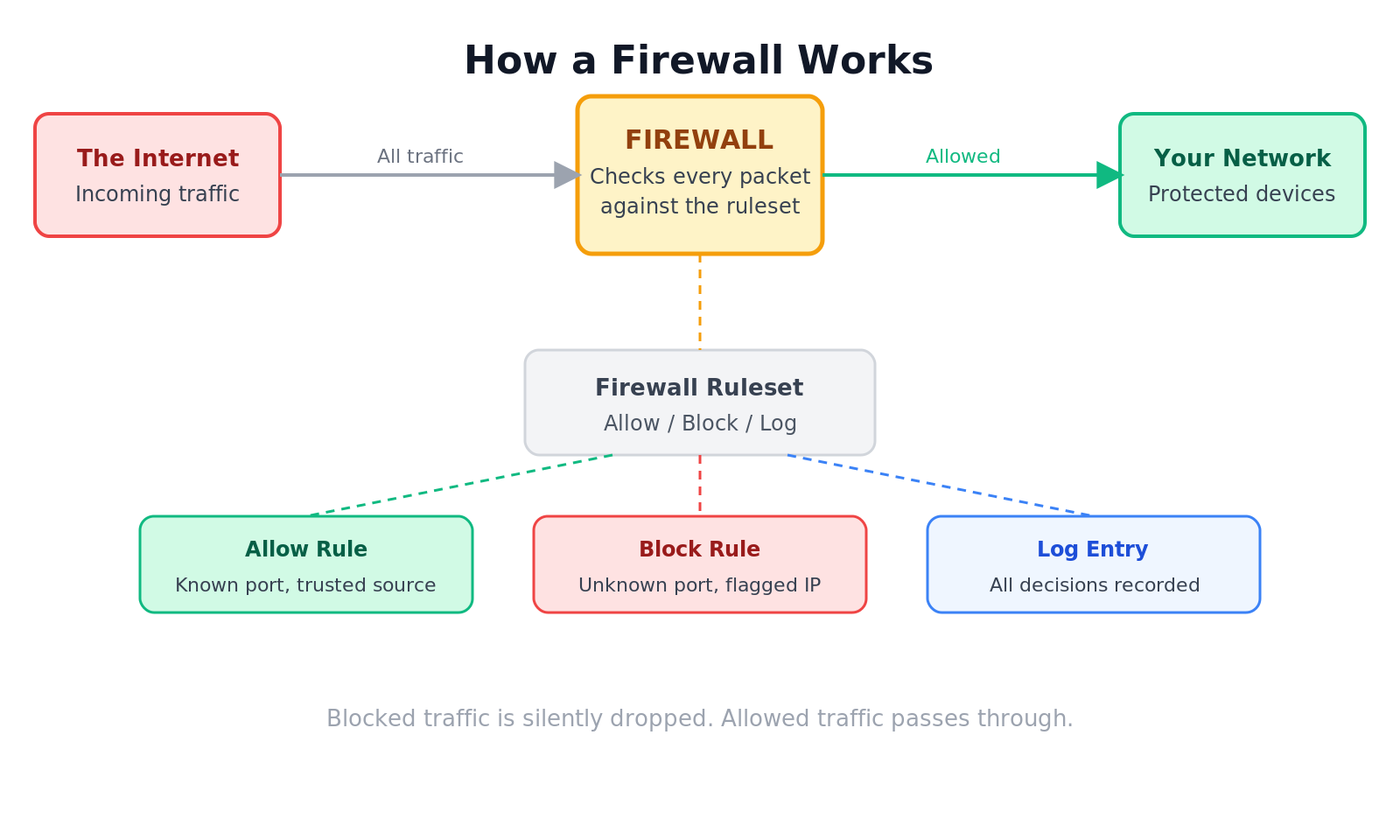
A firewall is a security system that monitors network traffic, both incoming and outgoing, and applies a set of rules to decide whether each packet is allowed to pass.
Think of it like a bouncer at a club. The bouncer has a list of who’s allowed in, what they’re allowed to carry, and where they can go. Traffic that doesn’t meet the rules gets turned away at the door.
How it works, step by step
- A packet of data arrives at the firewall. This could be a web page loading, an app updating, or someone trying to connect to a port on your machine.
- The firewall checks the packet against its ruleset. This includes things like: where did it come from, where is it going, what port is it using, and what protocol is it using.
- If the packet matches an allowed rule, it passes through.
- If it doesn’t match, or if it matches a block rule, it gets dropped. Quietly. The sender usually just sees silence.
- The firewall logs what it sees. These logs are useful later for spotting patterns or investigating something suspicious.
Where you’ve already seen firewalls in action
Your home router almost certainly has a basic firewall built in. It’s why random people on the internet can’t just connect directly to your laptop.
Windows and macOS both have software firewalls running in the background by default. When an app asks “do you want to allow this app to accept incoming connections?”, that’s the firewall asking for permission.
Businesses run more sophisticated firewalls at the edge of their networks, between their internal systems and the internet. These inspect traffic far more closely than a home router does.
The different types
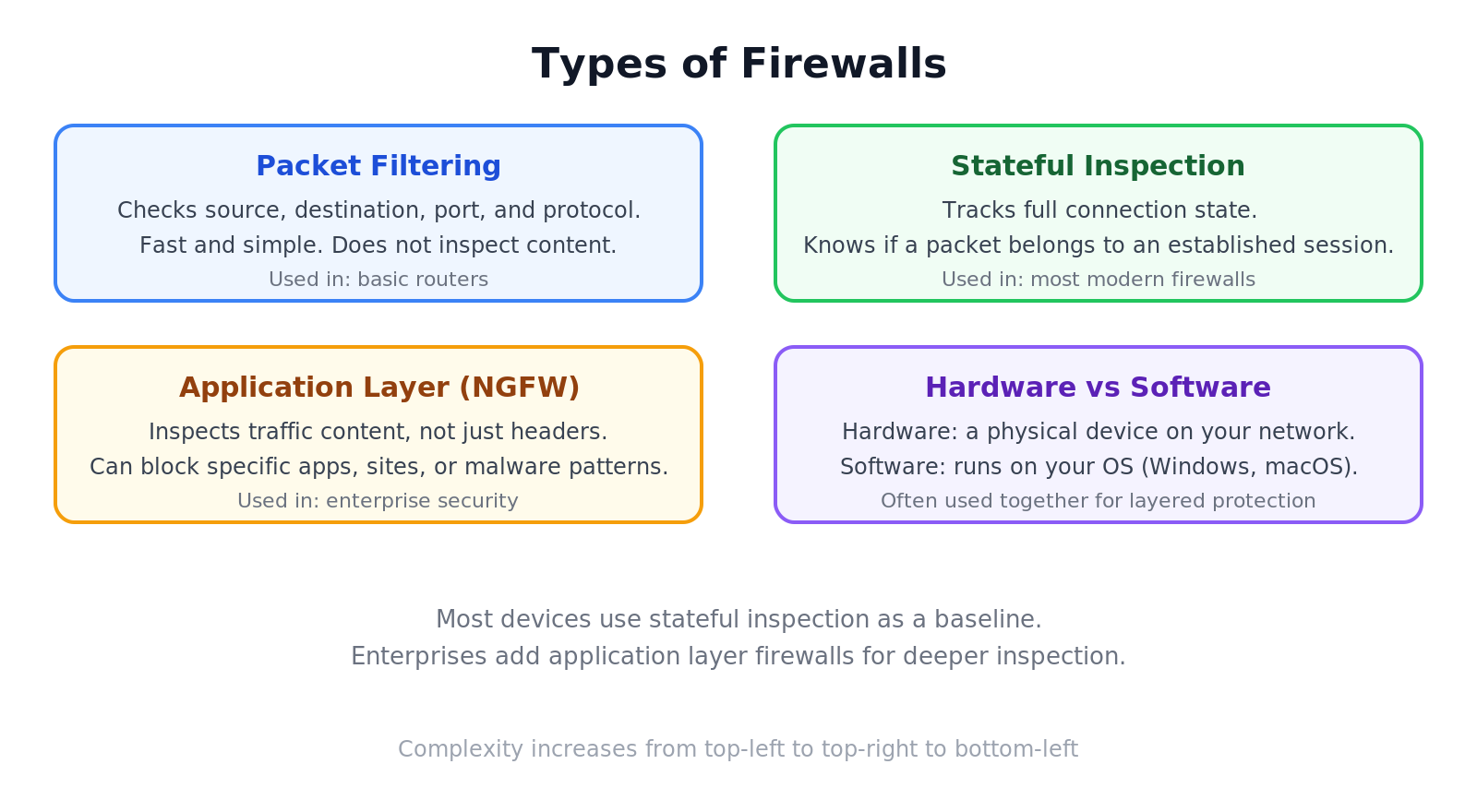
Packet filtering firewalls are the simplest kind. They check the basics: source address, destination address, port, and protocol. If the criteria match an allow rule, the packet goes through. Fast, but not very deep.
Stateful inspection firewalls are smarter. They don’t just look at individual packets in isolation. They track the state of connections, so they know whether a packet arriving is part of a conversation that was legitimately started or whether it’s just appearing out of nowhere.
Application layer firewalls (sometimes called next-generation firewalls) go even deeper. They can inspect the actual content of traffic. Useful for blocking specific websites, detecting malware patterns in downloaded files, or applying rules based on what application is making the request rather than just the port it’s using.
Hardware firewalls are physical devices that sit on your network. Common in businesses. Software firewalls run on the device itself, the kind built into your operating system.
What a firewall doesn’t do
Firewalls are good at controlling traffic. They’re not good at everything.
They don’t protect you from threats you’ve invited in. If you download malware, the firewall doesn’t know the file is malicious, it just sees it arrived on an allowed port.
They don’t protect you from encrypted threats that match allowed rules. Modern firewalls handle this better, but basic ones won’t look inside HTTPS traffic.
And they don’t replace other security measures. A firewall is one layer in a larger approach that also includes antivirus software, software updates, and good habits.
Wrapping up
Firewalls are one of the oldest and most fundamental tools in network security. They’re not glamorous, but they’re doing real work every time you connect to the internet.
The default firewalls on your home router and operating system are doing their job right now without you having to think about it. Understanding what they’re doing is the first step to knowing when you might need something more.
Connect with Nelson on LinkedIn
More posts, updates, and the occasional thread.
Related posts
11 Jun 2026
Social Engineering: The Hack That Doesn't Touch Your Computer
Attackers don't need to hack your computer. They just need to ask nicely.
11 Jun 2026
Public Wi-Fi: Why That Free Network at the Coffee Shop Isn't So Free
Free Wi-Fi is everywhere. So are the people waiting to see what you're doing on it.